


Koala Sampler
4.8523.00 Reviews
App Specs
- Version
- 2.0.3
- Updated On
- License
- $4.99
- Downloads
- 100,000+
- Developer
- elf audio
- Categories
- Music & Audio
- Platform
- Android, iOS
Screenshots
 Analysis by AppCompare
I’m most likely to recommend Koala Sampler to someone who wants to turn a sound they just noticed into a musical idea, without first setting up a full production session. It is a paid music-making app from elf audio, released in 2020, and its appeal is less about replacing every studio tool than about making sampling feel immediate. I’d think of it as a sketchbook for beats: useful when you want to capture, shape, and arrange sounds on a phone, and less suited to someone looking for a complete desktop-style recording environment.
What I’d decide before buying
The key question is whether you enjoy building music from short sounds. If you already like chopping audio, layering rhythms, or turning everyday noises into percussion, the basic idea here should make sense quickly. If you mainly want to play instruments, record long performances, or work through a conventional multitrack timeline, a broader mobile DAW may suit you better.
Koala Sampler costs $4.99, with optional in-app purchases priced from $2.99 to $4.99 per item. I’d treat the initial purchase as a commitment to a focused sampler, not assume that every extra is necessary. It has an Everyone age rating, and it runs on operating systems from version 8.1 onward. The current version is 1.4151.
The app’s 4.8 average from around 2,900 ratings and more than 100,000 installs suggest that it has found an audience among mobile music makers. Those figures are useful context, but they don’t tell you whether its particular workflow will click with you. I’d judge that by whether you want to make short, sample-led ideas rather than by popularity alone.
Why a pocket sampler can be the right tool
I’d start by asking whether you want to discover a beat from sounds around you or build a track from instruments and a traditional timeline. That distinction matters more than the app’s feature count: a pocket sampler rewards quick experiments, but it also asks you to make creative choices with whatever material you capture. With that in mind, the next section looks at where this hands-on approach earns its place.
Getting started by listening to your surroundings
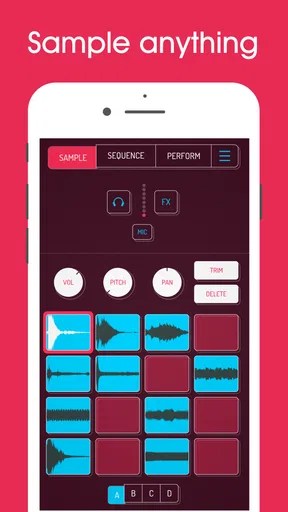
The first thing that stands out when you open the app is how straightforward it is. The design is minimalist, which makes it super easy to navigate, even if you’re a newbie. You don’t need to be a tech wizard to get started, and that's a big plus in my book.
Recording your sounds is as simple as pressing a button. You can use your phone’s microphone to capture anything around you—your voice, random street noises, or that weird sound your fridge makes. Once you’ve got your sounds, you can slice and dice them right in the app.
Worth Reading Before You Choose

Flipboard Shows What News Apps Must Do Beyond the Feed

Switching to Android Auto Means Rethinking Your Driving Routine

Google Calendar Makes a Crowded Week Easier to Manage

Ludo King Makes the Most of the Minutes Between Plans

Baby Panda World Brings Quick Play to Modern Phones, but Its Game Library Feels Busy

ESPN’s Live Game View Makes Following Close Games Easier
That direct path from recording to usable material is the part I’d lean on for quick experiments. A short voice note, a tap on a tabletop, or the rhythm of a passing sound can become raw material instead of something you meant to remember later. I’d record a few variations rather than expect one take to work perfectly: a quieter sample can be easier to shape, while a louder one may be more immediately satisfying but leave less room to adjust by ear.
From samples to a playable beat
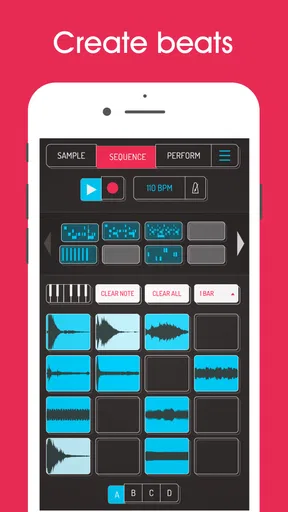
Now, let’s dive into some of the features that make Koala Sampler a favorite among music enthusiasts. First off, it has a 64-pad sampler, which means you can layer up to 64 different sounds. This gives you a lot of room to experiment and get creative.
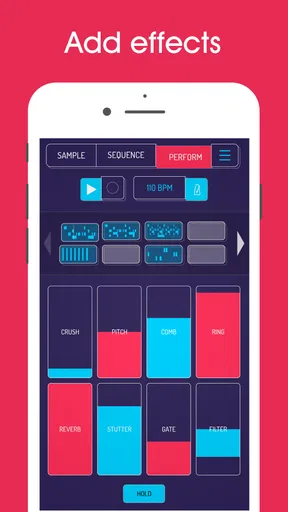
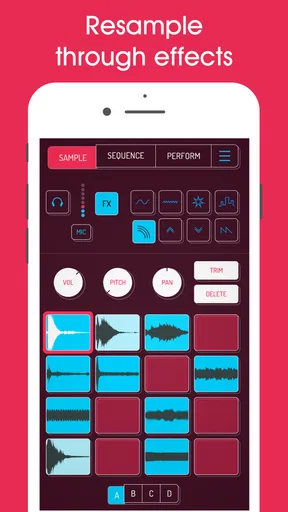
Another cool feature is the built-in effects. You can tweak your samples with effects like reverb, delay, and more, all within the app. It’s like having a mini studio in your pocket. Plus, the effects are easy to use and sound surprisingly professional.
The app also offers a resampling function, which allows you to record the output and flip it again for even more creative possibilities. It’s this kind of flexibility that sets Koala Sampler apart from other mobile sampling apps.
For me, resampling is most useful when a sound already has a character but still feels too plain to carry a part. I can process it, capture that altered result, then treat the new recording as its own source. The trade-off is that each pass can make the result less flexible: once several choices are baked together, changing one original layer may mean rebuilding the chain. I’d keep a clean version before experimenting if I thought I might want to revise the idea later.
Making a quick idea into a repeatable pattern
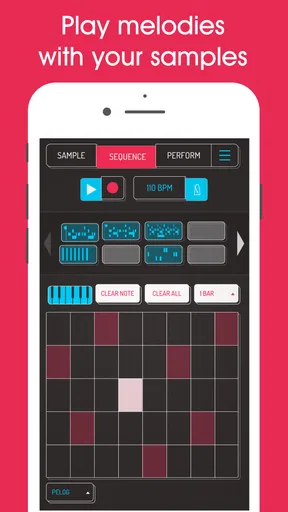
If you’re someone who loves creating beats on the fly, Koala Sampler has you covered. The sequencer is intuitive and user-friendly, making it easy to lay down a beat quickly. You can sequence your samples in a matter of minutes, and if inspiration strikes, you can get a basic track going in no time.
For those who are into live performances, Koala Sampler offers a neat feature to trigger samples during a performance. This makes it a handy tool for live beat-making sessions or impromptu performances.
A practical routine is to start with only a few sounds: one steady pulse, one accent, and a contrasting texture. That keeps the first pattern readable and makes it easier to hear whether the samples work together. I’d add more pads only when a part has a job to do; filling every slot can make a sketch harder to navigate rather than more musical. For a live set, I’d also rehearse the exact sequence of triggers instead of relying on improvisation alone, since a phone-sized interface rewards a simple, deliberate layout.
Where it fits beside other music apps
Compared with a general-purpose music workstation on a phone, Koala Sampler puts the emphasis on manipulating recorded sounds and arranging them into beats. That narrower focus is a strength when you want to move quickly from an interesting noise to a rhythmic idea. A conventional DAW is usually a better fit when you need a broader recording and editing workflow, while an instrument-focused app makes more sense if playing notes is the main attraction.
It also suits a different mood from using a hardware sampler: you can explore the idea on a device you already carry, rather than planning a dedicated setup. That convenience doesn’t make a phone identical to a purpose-built performance rig. If your priority is a carefully controlled live setup, or a long session with many connected tools, I’d choose equipment and software built around that job. Koala is at its best when portability and quick hands-on experimentation matter more than a large, elaborate workspace.
A small workflow that makes the most of it
One everyday use case is collecting sounds during a walk, then making a short beat while waiting for a friend or riding home. I’d capture a handful of distinct noises, trim the material into useful fragments, and test them against a simple sequence. The point isn’t to finish a polished song in that spare moment; it’s to preserve an idea while it still feels fresh. Later, I can decide whether the sketch deserves more work or was simply a fun experiment.
There’s a useful distinction between a sound that is interesting on its own and one that works in a pattern. A recording with a lot of background activity may feel vivid through headphones but muddy when repeated. I’d audition samples in the context of the beat early, rather than spend ages polishing them in isolation. That small habit helps prevent a common sampler trap: collecting plenty of appealing sounds but never finding a combination that holds together.
Another trade-off is that phone speakers can give a misleading impression of low-end weight and detail. I’d use headphones when making decisions about how samples sit together, then check the result at a comfortable volume on another playback system if the beat matters beyond a quick share. That isn’t a Koala-specific flaw so much as a limitation of judging any music mix on one small device, but it matters especially when samples are layered tightly.
Sharing, collaboration, and the handoff
Once you’ve crafted your masterpiece, sharing it with the world is a breeze. Koala Sampler allows you to export your tracks directly to social media or other platforms. Whether you’re uploading to SoundCloud or sending it to a friend, the app makes the process seamless.
And if you’re collaborating with other musicians, Koala Sampler supports file sharing, so you can easily send your samples and beats to your bandmates or collaborators for further tweaking.
I’d still agree on the handoff before starting a collaboration. A rendered track is convenient for listening and feedback, while someone who wants to change individual parts will need the relevant project material or samples rather than only a finished audio file. Keeping source recordings organized and naming them in a way your collaborator understands can save time. For casual feedback, sending a quick bounce is often enough; for detailed editing, plan the exchange around editable parts from the beginning.
Who should choose another approach
I wouldn’t choose this as my only music app if my usual work involved long vocal takes, detailed arrangement across many song sections, or extensive editing of recorded instruments. A full-featured mobile DAW is the more sensible starting point for those needs. Likewise, if I wanted ready-made backing tracks or a library of playable instruments rather than a hands-on sampling process, I’d look elsewhere in the music category.
There is also a creative limitation to consider: sampling encourages you to build around the sounds you have. That can be freeing, but it can also steer a song toward whatever happened to be easy to record. When I have a very specific melody or arrangement in mind, starting with a sampler may slow me down compared with an instrument or sequencer designed for that task. The best choice depends on whether I want to discover a direction through sound or execute a direction I already know.
The app has optional purchases beyond its upfront cost, so I’d begin with the core workflow and only consider an extra if I can name a specific need it would solve. That avoids paying for additions simply because they are available. For someone unsure about sampling, the most useful test is whether recording and reshaping a few sounds feels enjoyable, not whether they can immediately produce a finished track.
My recommendation
So, is Koala Sampler worth your time? Absolutely. It’s a powerful tool for anyone interested in music production, whether you’re just starting out or you’re a seasoned pro. Its ease of use, combined with its robust features, makes it a must-have app for any music lover.
In a world where music production tools can often be complicated and overwhelming, Koala Sampler is a breath of fresh air. It’s straightforward, fun, and incredibly versatile. If you haven’t tried it yet, grab your phone, download it, and start creating. You might just find it to be your new favorite tool for making music.
My recommendation is strongest for beat-makers, curious beginners, and producers who want a fast way to catch ideas away from a desk. I’d skip it if I needed a complete recording studio in one app, but I’d happily keep it close for turning small sounds into sketches. Its 482 written reviews add another sign of an active audience, though the deciding factor is still personal: if sampling is the part of music-making you enjoy, this focused approach is likely to feel rewarding.
Pros
- User-friendly interface for quick sampling.
- Supports multiple audio formats easily.
- Real-time effects enhance creativity.
- Intuitive drag-and-drop functionality.
- Responsive customer support team.
Cons
- Limited advanced editing features.
- Requires external storage for large files.
- Occasional crashes on older devices.
- No built-in tutorial for beginners.
- Lacks integration with some DAWs.
FAQs for Koala Sampler
What is Koala Sampler and what can it do?
Koala Sampler is a versatile, intuitive music production app available for both Android and iOS. It allows users to record samples using their device’s microphone, edit them with various effects, and sequence them into tracks. It’s perfect for both beginners and experienced music producers who want to create music on the go.
Is Koala Sampler beginner-friendly?
Yes, Koala Sampler is designed to be user-friendly, making it suitable for beginners. The app features an intuitive interface that simplifies the process of sampling, editing, and sequencing. Users can easily navigate through its functions without needing extensive music production knowledge, making it a great starting point for aspiring creators.
What are the main features of Koala Sampler?
Koala Sampler offers a range of features, including the ability to record samples in high quality, a variety of audio effects like reverb and delay, and a straightforward sequencer. It also supports MIDI, allowing integration with other music production tools. The app’s responsive design ensures a seamless experience across different devices.
Are there any limitations to the free version of Koala Sampler?
Koala Sampler offers a free version with basic features, but some advanced functionalities may require in-app purchases. These additional features might include more extensive effect options, more sample slots, or deeper editing capabilities. Users should review the app’s pricing structure to determine if the free version meets their needs.
How does Koala Sampler compare to other music production apps?
Koala Sampler stands out due to its simplicity and efficiency. Unlike some more complex music production apps, it focuses on providing an easy-to-use platform for quick sampling and track creation. While it may not have the extensive feature set of desktop software, its portability and user-friendly design make it a popular choice for mobile music producers.


